
You can assign insurance information to the insurance subscribers and the non-subscribers in the family. When you are assigning insurance to patients who are not insurance subscribers, there are three rules to remember:
You must assign Insurance to the subscriber before you can assign that insurance to another patient covered by the subscriber.
The insurance subscriber's name always appears in the Subscriber field when, for example, you assign a subscriber's insurance to a spouse, significant other, or dependent.
You can assign a subscriber's insurance to a dependent outside the subscriber's family as long as the dependent is in the Dentrix database.
To assign insurance to a non-subscriber
1. In the Family File, patient selected.
2. Double-click the Insurance card.
The Insurance Information dialog box appears with the Dental Insurance tab selected . Both the primary and secondary insurance information are displayed.
Note: To enter medical insurance instead of dental insurance, click the Medical Insurance tab.
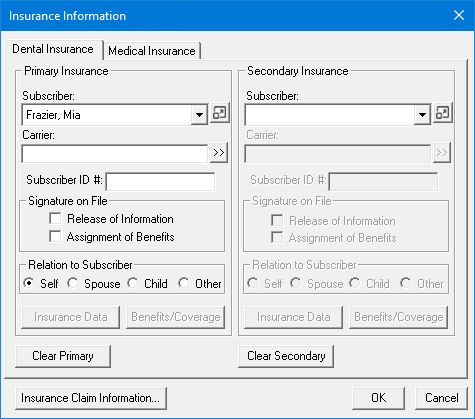
3. Click the Subscriber dropdown arrow.
A list appears.
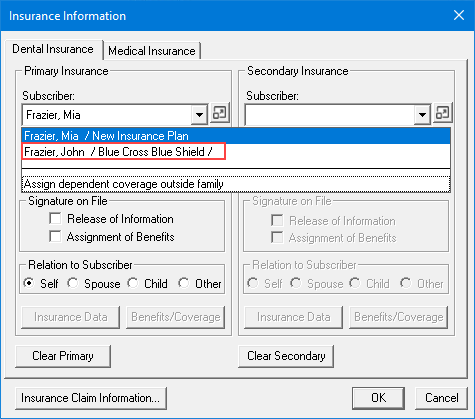
4. Select the desired subscriber, and then click OK.
All fields in the Insurance Information dialog box automatically show the subscriber’s insurance information.
5. Under Relation to Subscriber, verify that the relationship is correct.
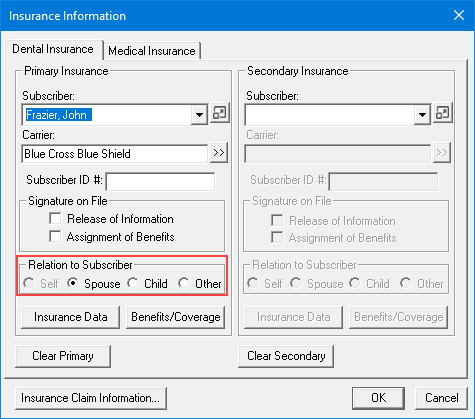
6. Click OK.
Note: Click the Insurance Data and Benefits/Coverage buttons to reference and record additional insurance information.